Hello, everyone.
Thanks for joining us for today's presentation
on monarch conservation planning tools.
I'm Tracy McCleaf.
I'm a biologist with the Fish and Wildlife Service
at the National Conservation Training Center
in West Virginia.
And we really appreciate your interest
in this webinar series.
And now, I'd like you to meet Cora Lund Preston.
She's going to-- she's from Monarch Joint Venture.
And she's going to introduce today's presenters.
Cora.
Hi, everyone.
Thanks, Tracy.
And thanks, everyone, for joining us.
As Tracy mentioned, my name is Cora Lund Preston
from the Monarch Joint Venture.
I'm also joined by the Monarch Joint Venture program
coordinator, Wendy, and education assistant, Shelby.
Today, Dr. Holly Holt and Jason Rohweder
are joining us to present on new monarch conservation planning
tools created by USGS as part of the Monarch Conservation
Science Partnership.
Dr. Holly Holt is the Monarch Joint Venture science
coordinator.
She's been working closely with the Monarch Conservation
Science Partnership to develop a national protocol
framework for monitoring monarchs and their habitat.
Information gained from this framework
will help us inform monarch conservation strategies.
Holt has a background in pollinator health and biology.
And she received her PhD in entomology
from Penn State in 2015.
Jason Rohweder has worked for the USGS Upper Midwest
Environmental Services Center for almost 20 years
as a spatial applications biologist.
He has interdisciplinary experience
in biology, geographical information systems,
and application programming.
His work empathizes landscape ecology
and the creation of flexible tools and models
to assess species habitat.
So if any questions come up during today's presentation,
Shelby, Wendy, and I will be monitoring
the chat box, where we encourage you to enter your questions.
We'll save your questions until the end.
And we will have a question and answer
period when our presenters are finished,
where some of these questions will be addressed.
So now, I'll turn it over to Holly to get started.
Thanks, Cora.
Before beginning, before Jason begins his presentation,
I'd like to offer a brief review of monarch biology
and summarize the research that led
to the development of the USGS tools
that are the subject of today's webinar.
The eastern monarch population overwinters
in forests in the central mountainous region of Mexico
and reproduces east of the Rocky Mountains and as far north
as Canada.
Every winter, the eastern monarch population
gathers in dense overwintering colonies in the forests
of central Mexico.
Researchers measure the cumulative area
occupied by these colonies and hectares,
providing an annual estimate of the eastern monarch population
size.
Unfortunately, the eastern monarch population
is in decline and reached its lowest recorded numbers
during the winter of 2013, 2014, where the colonies cumulatively
occupied less than one hectare of overwintering
habitat in Mexico.
While many factors have likely contributed
to the eastern monarch population's decline,
including climate change, other chemicals, and shortages
of floral natural resources, the decline
of the eastern population has been linked to loss of milkweed
from the north central region of the US, or the farm belt.
As you will recall, monarch caterpillars
require milkweed to develop.
And the adoption of glyphosate-tolerant GMO crops
has led to a large and documented decline of milkweed
in agricultural lands that historically
produced large percentages of monarchs
that overwintered in Mexico.
Noting the declines in monarch populations,
the Monarch Conservation Science Partnership
was formed as a working group in 2009 in Fort Collins, Colorado.
The Monarch Conservation Science Partnership, or MCSP,
is an affiliation of researchers and conservation professionals
that have been using available data
to model monarch populations and assess the impacts of threats,
establish population trends and habitat goals for monarch
conservation, and to develop conservation
tools like those Jason will present in today's webinar.
Today, I will briefly summarize three of the research projects
conducted by the MCSP that form the basis
for the creation of the USGS tools Jason will talk about.
For more in-depth discussion of these research studies,
please check out our webinar titled Monarch Conservation
Science Partnership, which aired on the 26th of May.
It is available through both the MJV and NCTC website.
So now on to research projects summaries-- first,
noting the downward trend in the eastern monarch population
overwintering size, the MCSP conducted an extinction risk
analysis.
This analysis predicted the chances
that the eastern population will shrink
to an unsustainably small size.
This analysis found not only and unsurprisingly
that the eastern population is shrinking,
but also that, according to IUCN standards,
monarchs are at significant risk of extinction and face
a risk that's greater than 20% over the next 20 years.
To reduce the chances of the eastern migratory population--
to reduce chances of eastern migratory population collapse,
the analysis recommended restoring
the overwintering monarch population size
to at least six hectares of overwintering
monarchs in Mexico.
To reach this conservation target,
the MCSP, among other conservation actions,
recommends adding milkweed back to the north central and
northeast landscape.
In fact, the MCSP estimates that approximately 1.4 billion stems
of milkweed were lost from the US landscape
since the introduction of glyphosate-resistant crops.
Study results recommend restoring approximately 85%
of this milkweed in the north central US region
and 15% in the northeast.
To figure out where milkweed could
be restored to the eastern monarch breeding range,
yes the MCSP took a landscape-level approach.
The MCSP divided possible breeding habitats
into various land use sectors, including marginal cropland,
agricultural land, CRP land, right of ways,
protected grasslands, and urban and suburban spaces.
By estimating how much milkweed is currently
present in these sectors and calculating how much milkweed
could be reasonably added to existing levels,
these analyses suggest that we'll
need help from all sectors to reach our goal of placing
an additional 1.4 billion stems of milkweed
in the eastern monarch population's breeding range.
In other words, an all-hands-on-deck approach is
required for success.
The tools that Jason will present today
are meant to aid conservation biologists, practitioners,
and land managers in conservation planning
for this species.
Jason, when you're ready, please take it away.
All right.
Thank you, Holly, for the great introduction.
Today, I'm going to describe and demonstrate
the application of the Monarch Conservation Science
Partnership Desktop and Online Spatial Tools that
were developed by myself and Wayne Thogmartin
here at the USGS Upper Midwest Environmental Science Center.
We receive funding for this work from the USGS Ecosystems
Mission Area.
And folks from the Monarch Conservation Science
Partnership were integral in helping us develop these tools
by providing guidance on data acquisition, parameter
setting, and tool debugging.
I'm going to describe first the desktop tools that
were developed and follow that up
with a description of the online tools.
As Holly mentioned in her slides,
there's been a well-documented decline
in the eastern population of monarchs
for over a long period of time.
We were brought into assist the Monarch Conservation Science
Partnership by developing geospatial planning
tools to help guide the conservation of the monarch
butterfly.
These tools were aimed at helping
to prioritize colonies for monarch conservation
and estimate the density of milkweeds
currently on the landscape and how
this number is affected by changes in management and land
use.
The desktop tools are developed as an ArcMap 10.3 toolbox using
the Python Scripting Library and contain three tools, the county
ranking tool, the milkweed calculators, and the county
area adjustment tool.
These tools are downloadable from the UMESC website,
and in addition to the tools, are prepackaged
with spatial data sets formatted for the tools
and also tables summarizes various data sets.
A user manual is also available for the website, which
describes the tools and provides demonstrations on their use.
The first tool I'll describe is the county ranking tool.
This tool allows researchers, conservation planners,
and resource managers the ability
to prioritize counties within the conterminous United States
according to multiple input field criteria.
First step in the development of this tool
was the creation of a spatial data layer representing
US counties assembled and attributed
with the information for each monarch-relevant input
criteria.
Some of these criteria represent positive attributes
for monarch butterfly conservation,
while others quantify potential threats.
Here's a list of data sources we use to assemble the data
layer used to inform the model.
Some of these data are distributed at the county
scale, whereas the other data sets
are based upon finer resolution raster
layers that have been summarized with the common county scale.
We tried to use the most current data available to us
for each data theme.
This included data layers related
to land use, land cover, infrastructure, conservation
protection status, agricultural-related data,
and monarch and milkweed-specific data
sets as well.
Here's a list of some of the approximately 200 data
fields within the input data layer's attribute table
that are available to the user when running the county ranking
tool.
Some of the data sets summarized were
derived from other data sets-- for instance,
the calculation of crop edge.
Upon tool download, the complete list
of fields and their descriptions is
available in the folder of summary tables.
To initiate the county ranking tool,
the user would click the script icon entitle County Ranking
Tool Within the Monarch Conservation Planning Tools
Toolbox.
A dialogue window will open with several input parameters
to fill.
First, select the County Summary shapefile.
This is provided when you download the tools.
If a subset of the tools are selected,
only the selected counties will be included in the analysis.
Next, you designate the unique county ID from the drop
down menu.
For this input data, we would select the ID.
Next, specify a directory to create the output strainer
by the tool and output shapefile name,
and a symbology layer used to color the output.
You can specify whether or not to calculate statistics
for the input fields designated if this box is checked.
The resulting attribute table will
be amended will summary statistics, including
mean, max, min, standard deviation, sum
in range for each input field.
This will increase the processing time of the tool.
Next, the user specifies which input field criteria
to use to rank the counties.
For each input field criteria, the user
must specify the field name from the shape file, a weight,
and whether or not lower values are preferred.
The combined weights for all selected input field criteria
must equal 100.
And no input field criteria can be used more than once.
Allotting a larger weight to a specific input
field criteria will give that criteria more influence
in the final ranking.
The user may check the lower value preferred checkbox
if they would like to devalue those kinds with high values
for certain input criteria-- for example, pesticide application
rates.
When all these parameters are set,
press the OK button to run the tool.
Upon tool completion, a new data layer
will be added within the activated frame within ArcMap.
This new data layer will be made with a specific output shape
file name with a two-digit unique suffix appended
at the end.
If an-- there we go.
If an output symbology layer was specified,
the shape file will be shaded accordingly.
In this example, counties in the output
are given a higher model score value
if they had a high grass-to-crop conversion, lower percent
grass, a lower market value, larger
increase in glyphosate application,
and a lower percent of the county in the Conservation
Reserve Program.
This tool's purpose is to help researchers, matters,
and others interested in monarch conservation highlight
counties that may be candidates for further, more
detailed analysis, and a finer resolution on the county scale.
This tool is valuable at highlighting variations
nationally according to selected input field criteria.
In addition to the shape file that is generated,
a log text file is also created.
A file name for this text file is the same
as the output shape file generated
by the tool with a TXT file extension.
Documented within this text file are the input field criteria
selections, their associated weights,
and whether or not lower values were
the preferred characteristic.
Summary statistics-- mean, max, min, standard deviation,
and range-- are included for the output field generated
and also for each input field criteria used, if designated.
The output data layer's attribute table
will have several attributes fields appended to it.
There are several steps taken in the ranking process.
First, the scores for each input field criteria
are normalized for each county to a consistent scale
of zero to 100.
Next, the normalized score for each separate input criteria
is multiplied by the user-defined weight.
The value is then summed for each individual input
criteria used to create the overall output
score for each county.
Two separate milkweed calculator tools
were also developed to allow the ability
to model the anticipated number of milkweeds on the landscape.
One of the tools allows the number of milkweed
stems to be calculated based upon projected
milkweed densities for several different habitat
classes entered by the user in stems per acre.
The second tool performs the same calculations using
milkweed density inputs entered it
in the format of meters squared per hectare.
The tools use a county summary shape file
as a base layer for analysis.
A seamless monarch-relevant land cover map
was used as a source for the summary information contained
within the shapefile.
This raster data set was developed
as part of this project.
There were a total of 42 different land cover
classes created.
These classes represent areas on the landscape
which may provide potential habitat for milkweed plants.
This data set was created for the lower 48 contiguous United
States.
Here's a list of data sources used
to develop the monarch-relevant land cover map.
We used a lot of the same input data sources
that we use for the county ranking tool,
including those related to land cover,
crop land, infrastructure, protection status, and crop
land productivity.
And here's a list of land cover classes developed
using these data sources.
Some of these classes are labeled with a low, medium,
or high attribute.
This describes their relative amenability or potential
for milkweed introduction.
Corn and soybeans are separated based upon their commodity
crop productivity index, whether marginal
or are not marginal soils.
Developed and transportation classes
are separated based upon their proximity to urban areas.
Grassland and pasture classes are separated according
to conservation protection.
And CRP is divided according to being
classified as wet or non-wet.
So here are these separated classes, [INAUDIBLE]
as marginal or not marginal.
CRP, grassland weather-protected,
pasture weather-protected, and things
like developed weather within urban or outside of urban.
We received assistance from folks within the Monarch
Conservation Science Partnership to assign milkweed amenability
rankings to each of those land cover classes.
Here is an example of rankings applied to some of the crop
land data layer codes.
So for instance, these are a the crop land
data layer descriptions.
And then they're categorized milkweed amenability rankings.
Here is a national monarch-relevant land
cover map with a legend of individual classes.
This data set, once summarized to the county scale,
provides the foundation for the milkweed calculator tools.
And here's a zoomed in portion of the same map,
showing the individual classes and how they
are arranged on the landscape.
This data is not available to the public at this resolution
due to the inherent sensitivity of two of the data layers,
which are the field level CRP polygons and transmission
lines.
Only the data summarized to the county scale
is available to the public.
And on this image in particular, we
are zoomed into an area that doesn't show any CRP polygons
or power lines.
But you get an idea of kind of what the raster data
set looks like.
To initiate one of the milkweed calculator tools,
you click script icon entitled Milkweed Calculator Stems
Per Acre or Milkweed Calculator Meter Square Per Hectare
within the Monarch Conservation Client Tools toolbox.
For this example, we will highlight the tool
based upon stems per acre input measurements.
Once the tool is selected, the user
must identify the input county summary shape file.
This is the shape file with milkweed habitat class area
measurements appended to the attribute table.
The shape file's area measurement attributes
should be in acres for the stems per acre tool.
If a subset of the counties are selected,
only the selected counties will be included in the analysis.
Next, you select again the unique county ID,
followed by the field denoting the appropriate area of field--
in this case, for acres-- and a directory on the computer's
hard drive to store the outputs.
In addition, a name should be specified for the output
shapefile and, if desired, an output symbology again chosen.
The outputs for the tools can be limited
to any of seven different monarch model regions developed
for this project.
This is accomplished by checking the box next to the region
or regions to include.
For example, whether to exclude the Florida monarch region,
Mexico, western, south, so on.
Finally, the user designates the predicted density values
for each of the milkweed habitat classes.
Those are down here.
So for corn and corn on marginal soils,
a milkweed stems per acre measurement is entered.
Here's a map of the locations of each of those monarch
regions used for the tool.
It is generally believed that milkweed density differs
among land covers by region.
As such, it is recommended that individual regions
with region-specific estimates of milkweed density
be calculated separately.
We expect to see different milkweed densities
in various types of land cover classes.
Here's a table showing some of these predicted
milkweed densities taken from the literature.
When all the input parameters are set,
press the OK button to initiate the tool.
Here's the map showing the output data
layer shaded according to the mean stems per acre measurement
for each county model-- in this case,
the core north central region.
So you can see the darker green areas here in Iowa.
And then the orange and red areas
where it's a lower stems per acre value.
Again, in addition to the shapefile that is generated,
a log text file is also created.
The file name for this text file is the same
as the output shape file generated by the tool
but with a TXT file extension.
Documented within this text file are
the milkweed density designated for each milkweed habitat
class, summary, statistics mean, max, min, standard deviation,
sum, and range for each milkweed habitat class
if that box was checked and summary statistics
for overall milkweed density attributes.
For this model run, there were over one billion stems
predicted within this region.
The power of this tool is ability
to model changes in milkweed stems on a landscape using
adjusted milkweed density values for amenable land cover
classes.
What we're attempting to do here is
model the processes that could increase
the density of milkweed within the area of interest
due to such things as planting milkweed,
altering management practices to be more pollinator-friendly,
expansion of organic farming, limiting applications
of neonicotinoids and other pesticides, and others.
So we can rerun the tool using modified input milkweed
density values for those amendable land cover types.
So for this example, we are increasing the milkweed stems
per acre for these two classes and then also the others.
But I'm not showing them.
And here's the output once the tool is
run with those changes applied.
If we go to the next slide, we see the changes
in milkweed density model under the two scenarios, the base
scenario and then we can go back to that modified scenario.
So we see with that change in milkweed densities
for those particular land cover types
an increase in predicted milkweed on the landscape.
Now if we look at the output log for the modified scenario,
we see an increase of 500 million
stems based upon the changes in milkweed density for those land
cover types right here.
A separate tool is developed to allow the user
to make hypothetical adjustments to the area
of monarch-relevant land cover classes
for user-defined set of selected counties.
These theoretical changes in landscape composition
can help to inform the user on the impact
of specific conservation development activities,
not just changes in the management on certain land
cover classes, but actual hypothetical conversions
of one land cover type to another.
The user can update the total area of a land cover class
within the selected counties or change the percentage of area
in a particular class within those counties.
For any increases in habitat class,
there are subsequent decreases in other habitat class selected
by the user to make sure that the total area for all habitat
classes does not change.
Outputs from the tool include added fields
with adjusted land cover class area measurements and an output
log text file.
The updated shape file and adjusted fields
can now be used as the inputs for the milkweed calculator
tools.
To initiate the tool, click the script icon
entitled County Area Adjustment Tool
within the Monarch Conservation Planning Tools toolbox.
Within the dialog window, the user
must select a county summary shape
file depicting the area of milkweed habitat classes
to edit.
Next, select a land covered class
to increase the area and also different land cover class
to perform a decrease in area of the same value.
The user can elect to input an absolute area
increase, decrease, or a percentage increase decrease,
of the current habitat class total.
In this case, we're modeling a 100% increase
in the area of CRP non-wet which is this code,
and a similar decrease in corn on marginal soils.
The percent area of change model is applied uniformly
to each county selected.
here is the output log from this particular model run.
If there is not enough for the milkweed land cover
class in a particular county for which the user has requested
to have the areas, acres decreased from,
the tool defaults to the maximum available area.
So for instance, a request is made
to convert 11,772 acres of marginal corn
to CRP non-wet here, but currently, there
is only 7,540 acres of marginal corn in that county.
The tool will default to only converting
the maximum amount available, the 7,540 acres in the county's
attribute table.
Therefore, the absolute area or percent increase
selected by the user is a potential increase.
The actual increase applied to all selected counties
maybe lower, in this case just under 50%, as indicated here.
The tool will document each county
where the requested amount was not completely filled.
That's all kept in that log.
When tool is completed, the user can then
rerun the milkweed calculator using these revised land cover
class field as input-- in this instance,
creating two new fields, CL098_01 and CL002_01.
Those are the new fields added.
Here is the output map generated by rerunning
the milkweed calculator using these revised land cover class
area measurements and using the modified milkweed density
inputs applied previously and the output log
showing an increase now of 690 million
stems, as compared to the baseline
current scenario run originally.
Upon completion of the desktop tools,
it became apparent that there was a desire
to offer these tools in an additional online format.
Not all desired users of the tools have access to ArcMap
or the training necessary to operate the desktop tools
within the GIS platform.
With this in mind, we developed an ArcGIS online web mapping
application loaded with relevant monarch datasets
and also integrating the county ranking tool
and milkweed calculator as ArcGIS Geoprocessing Services.
These online tools are available from the USGS Upper Midwest
Environmental Science Center website, displayed
on this slide.
Once the tools and map view loads, the first thing
that is opened is a window displaying the help information
describing the tools here, their operation and data sets
used to inform them.
It is recommended that the user reads through this information
before using the tools.
In addition to the tools, the application
is loaded with several monarch-relevant spatial data
layers that the user can view.
This is available by selecting the Layer List
button located here.
Layers can be turned off and on.
And the legends can be viewed.
Additionally by clicking the base map button,
the user can change the background map
using the application.
There are also buttons that allow
the user to make measurements, draw features on a map,
and also to print the map.
Specifically, the Monarch Conservation Science
Partnership, two tool buttons have
been added to the map, the milkweed calculator
button and the county ranking tool button.
Pressing the milkweed calculator button,
an input dialogue window appears with several boxes for the user
to enter desired stems per acre densities
for the milkweed-amendable and cover classes listed here.
So under the desktop tools, the user
has ability to limit the outputs of the tool
to any number of seven monarch regions,
listed here with check boxes.
Clicking the Help link down here will
supply detailed information on the tool.
When all the inputs are filled out, the user presses Execute.
If any stems per acre density values are not
filled out for a particular class, the tool will not run.
The tool then calculates the total predicted
number of milkweed on the landscape
by multiplying the area of each milkweed-amendable land cover
class for each county by the user-specified predicted
milkweed stems per acre value for that class
and then summing the individual predicted total stem
values for each land cover class to get an overall total number
of stems.
The tool will create a table summarizing
total milkweed stems broken up by monarch region entitled
Milkweed Regional Tab Results.
A similar table will also be created called the Milkweed
Total Table Results.
And that just has the total stems
calculated for that model run and an output data
layer entitled Milkweed Model Output Data Layer.
These are all displayed within the Output
tab of the milkweed calculator dialog window
and also within the layer list.
Darker green values within the map
depict higher density of milkweed stems predicted.
If we were to click on a county-- for instance,
the one here-- a pop up window opens
that we can view the data specific to that county,
including the acres for each of the land cover
classes as well the total acres in that county
and the output milkweed stem calculations, including
the total stems and the stem density there.
Outputs can be exported as text files
or as a feature collection or exported to a GeoJSON file.
To rerun the model using different input parameters,
first remove the existing outputs
from the milkweed calculator dialogue window Output
tab using the Remove icon, which is this X icon here.
Then click on the Input tab again
and update the stems per acre values
for land cover types you'd like to change
and any monarch regions you would like excluded
from the analysis and then press Execute down
at the bottom of that window.
The county ranking tool was also developed as an online tool.
We limited the input criteria to 28
of the most important criteria.
Here are some listed.
To initiate the tool, click the County Ranking Tool button
here.
A dialog window open with several input parameters
to fill.
For each input parameter listed, the user
will designate a numeric positive integer
value for the weight for that particular criterion
in the model.
The larger the weight, the more influence
that criterion will have in the ranking process.
All criteria are required to have a weight entered.
If the user does not want that particular criteria to have
an influence on a model, a zero should be entered.
Again, the user may check the Lower Value Preferred check box
right here to devalue those counties
with high normalized values since some of these criteria
represent positive attributes for monarch butterfly
conservation, while others quantify potential threats.
For this example, I've given percent grassland pasture
a weight of 20 here, and cultivated crops
a weight of 20, and Lower Value Preferred checked.
Percent of county CRP weight of 20 glyphosate application rate
2012, a weight of 20.
And I'll give the milkweed species [INAUDIBLE]
weight of 20.
Once all criteria weights have been enter,
the user selects the Execute button
at the bottom of the dialogue window.
Upon execution, the tool will create a new data layer
entitled County Ranking Tool Model Output Data
Layer and a table summarizing output model scores called
the County Ranking Tool Output Summary Table.
The summary table has fields yielding number of counties,
mean model score for all counties,
standard deviation for all model scores,
and the total weight supplied by the user that
was used for the calculations.
The output map will be shaded according
to this color ramp, higher values in red and purple
and lower values in blue and green.
Clicking on an individual county will, again,
bring up the county's individual model values and the table.
And the output layer can be exported to user's computer.
In summary, the tools described here
provide researchers, conservation planners,
and resource managers with the ability
to explore scenarios for predicting milkweed available
to monarch butterflies and to highlight national scale
conservation priorities.
We feel these are initial but essential steps
in the conservation design process.
Coupled with properly-elicited stakeholder goals,
these tools can provide users with the means
for depicting a path toward restoring monarch butterflies
to former levels of abundance.
And that is all I have.
Thank you.
Great.
Thank you, Jason and Holly.
We really appreciate you sharing your knowledge and expertise
with us today.
And thanks again to everyone who's listening.
We're really glad that you are all here.
We're now going to take the next few minutes
to talk with Holly and Jason and ask
them some questions that came up during their presentations.
If you have questions still, make
sure to enter those into the chat box,
and we will get to all of the questions that we can today.
We did also record today's webinar.
So if you want to share it with your friends
or come back and watch it again, it
will be available later on on the NCTC and Monarch Joint
Venture websites.
We'll follow up after today's webinar
with a short survey for you to complete,
sharing any feedback you have.
We'd love to hear from you and really appreciate your response
to that.
So we'll get started with the Q&A now.
If we go over the allotted time, feel
free to step out when you need to.
And as I said, we'll try to get to as many of the questions
as we have time for today.
So let's start with a pretty simple one for Jason.
Jason, are these tools usable for the western monarch
population?
The data for both tools, the county ranking tool
and the milkweed calculator tools,
was developed for the entire lower 48 states.
So yes, you could you model just the western region
if you wanted to.
And like we said before on the slides,
those milkweed density values might differ than the north
central, for instance.
So you would probably want to apply different values
for those, but yes.
Great.
Thank you.
And then is there any special software required
to use the online tools?
No.
You just need a browser and internet connection
to use those online tools.
Great.
And what software would you recommend folks have
if they want to use the desktop tools?
The desktop tools are an ArcMap 10.3 tool
box, so you would need to have that software loaded.
OK.
Great.
And then getting to a little bit more of a technical question,
again for you, Jason, how can users
find out how the attributes for the county ranking tool
were derived?
And what were the inputs?
Is that information available in the program?
Or how could they find out more about that?
Yeah, so if you go-- let me see if this website here.
If you go to this website, you can download the desktop tools
from there.
And also, there is a user's manual.
And within that user manual is a detailed description of how
the county ranking, the source layer
was developed for the county ranking tool
and also how the seamless monarch-relevant land cover
data layer was also developed.
So the actual steps used to create those layers
is outlined in detail within that user manual.
Great.
And then similarly, do your models account
for monarch preference for different milkweeds
or different milkweed density or quality?
No, it does not separate by milkweed species.
And when you supply those milkweed density
values for each of those land cover classes,
I guess you have to take in account
which milkweed you are interested when
you apply those values.
OK.
And then have data have been gathered or are
there plans to gather data to verify
the on-the-ground abundance of milkweed
in various habitat types as it relates to this model?
Well, a lot of the values we use,
like when you start the tool, it actually
has a default value specified.
And those are values that were taken from the literature.
So that's kind of your baseline.
But you know, those are easily modified by the user
if they want to alter those.
But the groundwork has already been
done to actually look to see what kind of milkweed density
there are for a lot of these land cover classes.
And those were developed primarily outside of my realm
but within the Monarch Conservation Science
Partnership.
They've done a lot of that background work.
This is Holly.
And I'd just like to add to Jason's response.
Sure.
The MCSP is working on developing an integrated
monitoring framework.
And the goals of this framework are
to monitor monarchs and their habitat
in a spatially representative way.
So hopefully in the future, we'll
be able to gather information about milkweed density
across the US landscape and in up to six strata, which include
protected grasslands, unprotected grasslands,
right-of-way habitats, urban and suburban spaces, and CRP lands,
and agricultural lands.
And granted, as you move across the US from the east to west,
you know, these values may differ.
The species may differ.
And this framework aims to collect information
about milkweed species, milkweed density
in these different strata across the US.
But that is a framework in progress.
And we're also looking to monitor
several other biological attributes that
are relevant to monarchs and their survival,
including availability of living nectar plants
and then look at monarch utilization of these habitats
and presence of both immature monarchs and adults.
Great.
Thank you both.
Can you provide an example of how
the milkweed calculator or the county mapping tool
could be used by a practitioner?
By a practitioner, meaning?
By a conservation practitioner-- what's
kind of an example scenario that someone could use these tools?
Well, besides what I outlined?
Yeah.
Oh, I guess just by altering those milkweed densities,
you can kind of look at how under different management
scenarios what you can look for for increases
or decreases in milkweeds based upon those values.
I guess that's the way I would see them using it, just
altering that, altering the land cover types within a county,
see how that alters the amount of milkweeds on landscape.
I hope that answers it.
Yeah, I think so-- Just waiting one moment
while we pull some more questions from the chat here.
So sure, while you're pulling questions,
I just have a couple more thoughts to quickly add
to what I discussed earlier.
I think it is important to mention
that as this framework has been developed, in development,
you know, we're really hoping to engage
lots of different monitoring entities
in helping to collect this data.
Because to gather this data, the skill
necessary to gather an understanding of monarch
habitat and trends, we would hope
that anyone who is out there doing monitoring
would be able to collect data and contribute it
to this framework.
There is a previous webinar.
It's the same one that I mentioned earlier
that was aired on the 26th of May that
talks a little bit about this framework.
And so there's some more details in there.
Great.
Thanks, Holly.
So where can we get updates on when the monitoring
framework is available, Holly?
So that's something that's currently being figured out.
Plans for 2017 are being worked on.
And the MCSP is going to be having their annual meeting
in January.
And one of the topics of discussion
are working on how we're going to create a platform
to put protocols online and also provide
information about where the priority sites are
for monitoring.
Great-- so another question for Jason.
Sure.
So based on your presentation, it
sounds like there's a lot of flexibility
for users to put in their own data
and an understanding of existing milkweed densities.
Is that accurate?
Yep.
Actually, that's why I make-- let
me see if I can find the slide here,
like within the milkweed calculator,
that's why I have you specify explicitly
the county summary shape file, the unique ID,
things like that.
I could have hardcoded that, but I
allowed it to be open-ended so the user could
make modifications or create their own,
for instance, summary of land cover area within each county
and run the tools that way.
And then you just have to specify
where the fields lie within that user-defined attribute table.
So a user can enter their own data as well,
same with the county ranking tool.
Great.
All right.
Let me see.
That looks like the last question that I have on my list
right now.
Let's see if we have any more trickling in just for a moment
here.
Jason, would you mind putting up that website on your last slide
again.
Sure.
So folks can see that.
OK.
We did have another question.
Will the existing predicted densities
be updated as new data become available?
We don't have any plans for updates right now.
But that's something that could be done,
I guess is the easiest way to put that.
OK, great.
And the resources available and how we go forward from here
with the tool development.
OK.
All right.
Well, I think that's what we have for questions.
Like I mentioned and like Holly mentioned,
there are other webinars available
that touch on some of the Monarch Conservation Science
Partnership issues.
And this will be posted on the website.
But I just want to say a big thank you again to Jason
and Holly for sharing with us.
And thanks to NCTC for hosting this webinar
and to all of our participants for joining us today.
We hope to see you for our next webinar
about monarch overwintering biology on Thursday, January
26th.
And you can find out more information
about our upcoming webinars through the spring
on the Monarch Joint Venture website.
So thanks again so much, everyone, and Happy Holidays.


 For more infomation >> Pregnancy Story + Baby Goodies ♡ 25 Weeks! (Legendas em PT) - Duration: 11:51.
 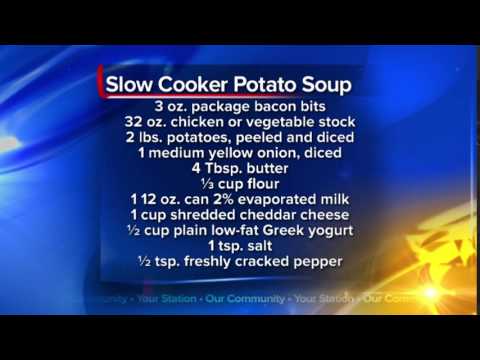 For more infomation >> What's For Dinner: Slow Cooker Potato Soup - Duration: 0:13.




Không có nhận xét nào:
Đăng nhận xét